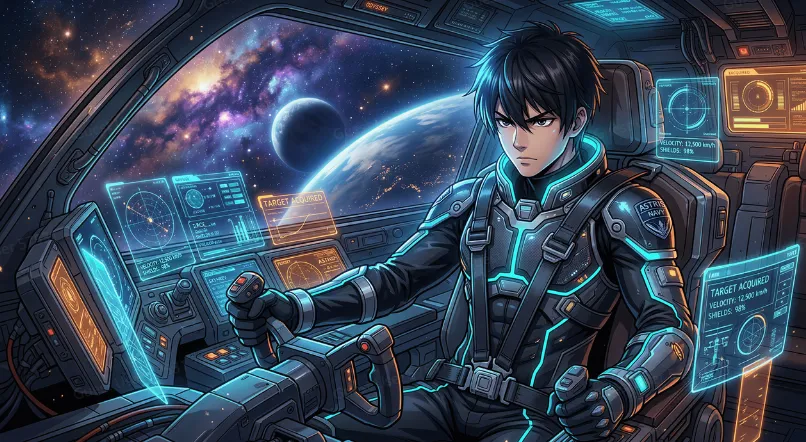
The shift towards text-to-image technology has revolutionized how anime is produced, transforming written concepts into refined visual art. Expressive characters, immersive scenes and unique artistic styles are now generated in minutes with detailed prompts. This is a method that helps artists, storytellers, marketers and hobbyists work through creative ideas more effectively. With its integrated conversational creation, image generation, and editing capabilities, Framia Pro streamlines the anime production workflow and promotes creativity with polished prompts and versatile creative features.
Understanding Text-to-Anime Image Generation
AI processes instructions given in text, determines relationships between objects, and converts the text into a visual composition. Modern image models learn all about character, clothing, backgrounds, lighting, colors, and artistic styles. Rather than manually drawing each element, creators use natural language to describe entire scenes. Then, the system integrates those details into a unified picture, maintaining the artistic uniformity. Framia Pro lyric video generator makes this easy by using conversational interactions, which can help refine the process promptly before regeneration. By lowering technical hurdles and maintaining creative freedom in visual storytelling, the technology makes it accessible to both novices and seasoned creators.
Building Effective Anime Prompts from Scratch
Good prompts start with a vision and then move to relevant visual details. Carefully describe the character’s appearance, hairstyle, facial features, age, pose, clothing, accessories and surrounding environment. Add emotions, weather, background, camera and preferred anime style for added consistency. Note if the art style should be like manga, realistic anime, cyberpunk, fantasy, chibi or something different. Framia Pro also allows the transformation of references starting from photographs, maintaining the essential visual characteristics. In the future, the created artwork can be used to enhance creative endeavors using AI picture to video conversion while maintaining the original artistic vision.
Steps to Turn Text Prompts into Anime Masterpieces with AI Anime Generator
Step 1: Pick an AI model for prompt-based creation
- First, you need to sign up for Framia Pro. Next, go to the “Home” tab present in the left vertical menu bar.
- Later, click on “Design” from the drop-down menu option present in the left bottom corner of the dialogue box.
- Next, select the model that best interprets your creative text prompts.
- Under the “Select models” menu, choose the “Image” option.
- Available choices include “Seedream”, “GPT”, “Nanobanana”, “Flux Max”, and “Qwen”.
Step 2: Write your prompt and generate the artwork
- Click the “+” tab and upload a photo from your device if you want to use it as a reference.
- Enter a text prompt in the dialogue box. Clearly describe how you want your anime image to look.
- Select the aspect ratio from the “Settings” tab.
- Click the “Generate” tab to begin photo-to-video creation.
Step 3: Improve your masterpiece or save it
- View the generated image through “Preview”. If you want further improvements, edit it in the storyboard or via chat.
- Apply “Quick Edit”, “Regenerate image”, or “AI Erase” whenever needed.
- Once satisfied, click the “Download” tab present on the menu below the video to save the file to your local device.
Elements That Make Text Prompts More Effective
Prompt quality strongly influences generated artwork because every descriptive detail guides the visual interpretation. Consider these essential elements while preparing instructions:
- Clearly identify the main subject before describing supporting details.
- Describe facial features, hairstyle, body posture and distinctive features.
- Explain what clothing, accessories, color and significant visual textures are.
- Add in gestures that express emotions appropriate to the scene.
- Talk about the environment, scenery, weather and objects around them.
- Set a light source (e.g. sun or moon) or neon or magic lights.
- Choose the style of art you are going with, such as manga, fantasy, cyberpunk, realistic anime, or chibi.
- Check and edit the results and tweak the text to make it more visually consistent.
Prompt-Writing Techniques for Better Anime Results
Good prompt writing is done in a logical order rather than a random description. When describing a character, begin by describing their main role before moving on to the visual characteristics and distinguishing features. Clothing, hairstyle, accessories, scenery and environmental objects continue to support the story. Describe lighting: how it affects the sense of atmosphere, emotion, and depth. Where appropriate, talk about the use of lights such as cinematic, sunset, dramatic, magical or neon lighting. Lastly, specify the artistic style that you would like the image to have, and then carefully review the image created before modifying the wording. Every iteration brings clarity and minimizes confusion, enabling the anime generator to create art that aligns more closely with creative vision.
Refining AI-Generated Anime Images
The process of image generation is not something that is often done in just one go because there may be some small tweaks that make for a stronger composition. The great part about Framia Pro is that users can continue to edit without having to restart the entire workflow, which saves precious creative time. Facial expressions, clothing details, object placement, lighting balance and background composition can be adjusted in minor details. Regular editing also aids in keeping characters consistent throughout several scenes, chapters of manga, promotional art and animated ideas. It is possible to use alternative visual directions, and doing so promotes experimentation without losing significant character features. These more polished images can then be used for animation, storyboarding or other multimedia production.
Producing Multi-Format Marketing Content in One Workflow
Framia Pro also has a centralized creative canvas that focuses on AI workflows rather than individual generation tools. A project description turns into copywriting, visual assets and polished video production all in one place. Several sophisticated models add their expertise in image, animation and movement, with voice, music and editing functions finishing the picture. This structured workflow eliminates repetitive manual coordination between different applications, and ensures creative assets remain organized across complex marketing and multimedia initiatives.
Going Beyond Images with Framia Pro
Anime illustrations are often the starting point of a greater creative journey, not the end. Framia Pro allows you to take the generated images further and transform them into animated sequences by using the advanced motion generation models, which maintain the identity of the generated image during animation. Static characters become engaging scenes suitable for use in trailers, promotional content, storytelling projects or creative presentations. This makes image generation, editing, animation and project organization all in one place as well, making production easier, as creative assets are connected throughout all development phases. This seamless workflow enables a more efficient path from initial concept sketches to fully realized visual narratives, without any unnecessary delays.
Conclusion
The importance of well-structured prompts cannot be overstated when it comes to creating impressive anime artwork with AI, as each detail in the description helps shape the final product. Strong results come from clear subjects, expressive emotions, thoughtful environments, balanced lighting, and defined artistic styles. Framia Pro integrates the generation, refinement, animation and project management in a connected workflow, which facilitates creative development. By trying out various prompt formats, editing methods, and styles, one can progressively refine the images and unlock a wider range of possibilities for diverse anime-themed endeavors.
Hi, I am Admin of Punwaves.com, your ultimate destination for clever puns and laugh-out-loud jokes you Dive in for daily wordplay waves that keep your humor fresh and fun.